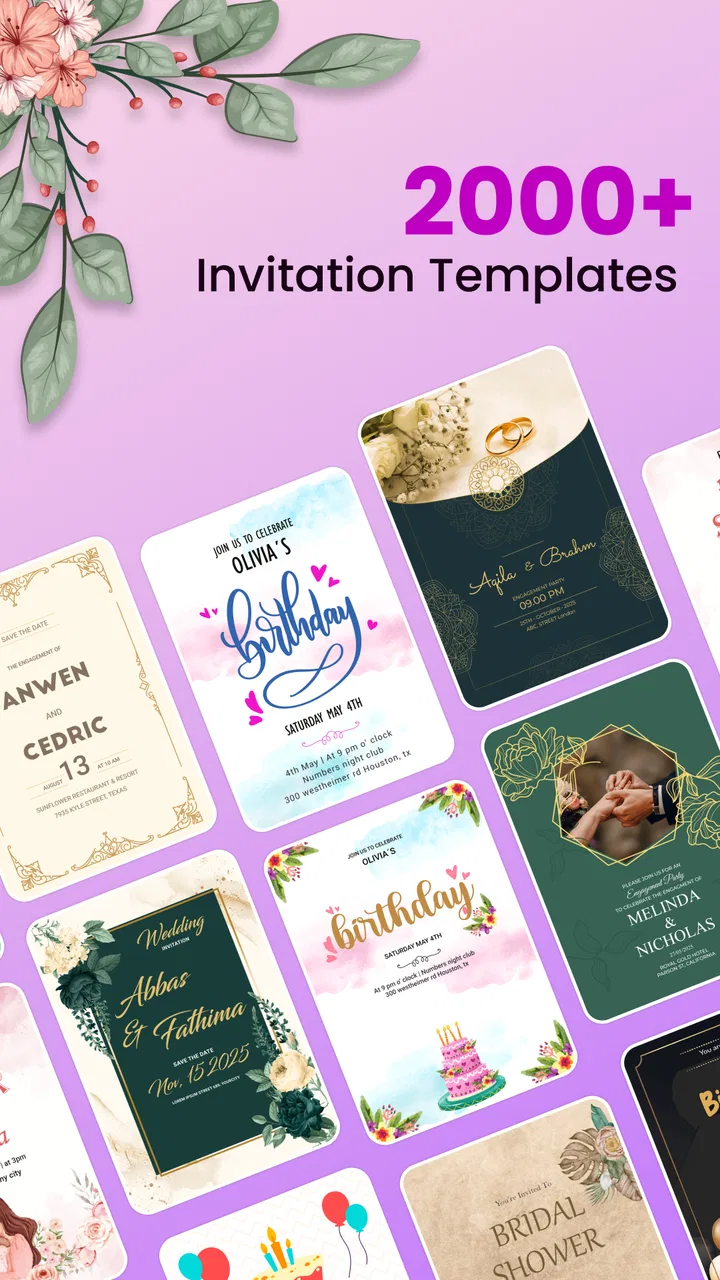
Invitation Maker - Card Design
- 4.2
- Rating
- 1.00M
- Installs
- Free
- Price

 Analysis by App-foxy
When I need to make an invitation quickly, I usually want something more personal than a plain message but less demanding than designing a complete card from scratch. Invitation Maker - Card Design is built for that middle ground. It is an events app from Splaish Studio that focuses on creating invitations and greeting cards for weddings, birthdays, and other special occasions. After spending time with it, I found the main appeal quite clear: it helps turn a last-minute idea into something presentable without requiring me to be a designer.
What makes the experience interesting is how closely it depends on the way I use my phone. The app is most useful when I am connected, have a clear idea of the event, and can give a few minutes to choosing a design rather than rushing through every screen. It is not a replacement for a full desktop design tool, and I would not choose it for a highly controlled print project. For everyday invitations, however, it offers a practical balance between speed, decoration, and personal input.
How the app feels when creating an invitation on a phone
The first thing I noticed is that the app is organized around a very specific task instead of trying to be an all-purpose graphics editor. That focus helps. I can approach it with a birthday, wedding, dinner, celebration, or greeting in mind, then work toward a finished card rather than starting with a blank canvas and wondering what to do next.
You May Also Like

 Blood Strike: 2.5 Anniversary
Blood Strike’s Loadouts Turn Every Drop Into a Tactical Gamble
A close look at Blood Strike’s custom loadouts: how fast access to signature weapons reshapes its battle royale rhythm, rewards preparation, and narrows the gap between fights.

 Pandora - Music & Podcasts
Pandora’s Music Is Easy to Start, but Harder to Recover
Pandora’s strength is its low-effort path from a seed to a station. Its weak spot is how much confidence it asks you to place in connection, setup, and quiet recovery.

 8 Ball Pool
 Is Built on Rivalries, Rematches, and Routine
A close look at the rivalries, rematches, shared routines, and unanswered safety questions that turn a quick pool match into a persistent mobile community.

 Samsung Music
’s Quiet Strength Is Playing What You Already Own
Its reach comes less from spectacle than from dependable access to a personal library. That simplicity is both the app’s strongest retention engine and its ceiling.

 AccuWeather: Weather Radar
AccuWeather Review: A Quick, Clear Forecast for Everyday Decisions
For everyday plans, the best forecast is the one you can understand quickly. AccuWeather makes rain timing, radar, and local conditions easy to act on, with a few trade-offs.

 Hill Climb Racing
Why Hill Climb Racing Still Turns Crashes Into One More Run
A tiny car, a bumpy hill and one more upgrade: Hill Climb Racing keeps resurfacing because its simple chaos makes every near-miss feel personal.
More From Our News Desk
View All News


That matters on a small screen. Mobile editing can become frustrating when every action requires precise tapping or when the interface exposes too many controls at once. Here, the invitation-first approach makes the process feel more approachable. I can concentrate on the event’s mood, the wording, and the visual arrangement instead of learning a complicated design system.
The strongest use case is a card that needs to look thoughtful but does not need a completely original visual identity. A birthday invitation for family, a wedding announcement for a small gathering, or a greeting card sent to several people can all benefit from a ready-made starting point. I still need to make decisions, but the app reduces the amount of visual work between an idea and a shareable result.
I also like that the app is suitable for more than one kind of occasion. Many invitation tools are narrowly focused on parties, while this one also covers greeting cards and special events. That broader range makes it more useful to keep installed. I can return to the same app for a celebration invitation one week and a seasonal or personal greeting another week without changing tools.
A realistic last-minute scenario
Imagine that a friend tells me on a Friday afternoon that a small birthday gathering is happening on Sunday. I know the location, time, and guest list, but I do not want to send a dry text. I can open the app, choose a style that matches the occasion, add the essential details, and review the card on the phone before sending it through my usual communication method.
The important point is not that the app removes all effort. I still have to check spelling, confirm the time, and make sure the wording is clear. Its value is that it gives me a visual framework quickly. Instead of spending the evening arranging colors, spacing, and decorative elements manually, I can spend that time deciding what the invitation should actually say.
For a wedding, I would use a slower workflow. The card may need names, venue information, RSVP instructions, dress guidance, and possibly wording that must be approved by more than one person. In that situation, the app can help with the visual draft, but I would not treat the first version as final. A mobile design is easy to make and just as easy to send before noticing a small but embarrassing mistake.
Connectivity changes the experience
The app feels most comfortable when the phone has a reliable connection. Browsing design material, moving between creation steps, or preparing a card can be less predictable when the network is weak. I do not assume that every part of the workflow is available without a connection, so I plan important invitations while online rather than waiting until I am in a basement venue, on a crowded train, or using an unreliable public network.
This is especially relevant for people who make invitations during travel. A wedding guest may be trying to create a card from a hotel lobby, or a parent may be preparing a birthday invitation while moving between school pickup and errands. In those moments, the app’s convenience depends not only on the design tools but also on whether the phone can maintain a stable connection during the work.
My practical habit is to open the app before I urgently need it. I browse a few styles, decide which direction suits the event, and only then begin entering the final details. That separates the creative decision from the time-sensitive part of the job. If the network becomes slow later, I am less likely to waste time repeatedly changing direction.
The best mobile workflow is to prepare the visual choice first, then enter final event details after checking the connection. That small change reduces unnecessary rework and makes the app feel much more dependable in real situations.
Personalization without overworking the design
A common mistake with invitation apps is trying to use every decorative possibility at once. I get better results when I treat the selected design as a guide. I add the event information, adjust the wording to sound like me, and resist turning a clean card into a crowded noticeboard.
For birthdays, the tone can be informal and warm. For weddings, restraint usually works better because the names, date, venue, and response information need to remain easy to read. For a general greeting, the visual message may matter more than a long block of text. The app is most helpful when I choose the format according to the recipient instead of expecting one style to suit every event.
One useful technique is to write the complete message in a notes app before opening the design. That gives me a chance to remove repeated phrases and check names separately. On a phone, editing text inside a decorative layout can make it easy to overlook a typo. Preparing the wording first also helps me judge whether the chosen card has enough room for the message.
I would also keep the first version simple. If the invitation already has a strong visual theme, a short message and clearly separated event details often look more polished than a long explanation. This is one area where the app can encourage good design decisions, but it cannot make them automatically. The final quality still depends on what I enter and how carefully I review it.
Where it fits among familiar alternatives
Compared with sending a plain text message, the app gives an event more personality. A visual invitation can make a small gathering feel intentional, and a greeting card can feel more considered than a quick line in a chat. That difference is meaningful when the recipient is a family member, close friend, or group of guests who will appreciate the extra effort.
Compared with a general-purpose design editor, the advantage is focus. A broad editor may offer more control over every element, but it can also demand more time and design knowledge. I would choose a general editor when I need exact branding, unusual dimensions, complex layers, or a carefully prepared print file. I choose this app when I want a convincing event card without building the entire visual system myself.
Compared with paper invitations, the phone-based workflow is faster and easier to revise. A changed venue or corrected time can be handled before sending rather than forcing me to replace a stack of printed cards. The trade-off is that a digital card may not have the same physical presence, and the final sharing step still depends on whatever messaging or social platform I use afterward.
That last point is important. This is a creation tool, not a complete guest-management service. I would not expect it to replace a calendar, RSVP tracker, mailing list, or event-planning system. If my event needs attendance tracking, reminders, payment collection, or detailed guest coordination, I would pair the invitation with another tool.
What happens when the connection becomes unreliable
Connectivity problems are most annoying when they arrive after I have already invested time in a design. A slow response can make me wonder whether a tap worked, whether a change was saved, or whether I should try again. Repeating an action too quickly is risky because it can create confusion and make recovery harder.
My approach is deliberately cautious. If a screen takes longer than expected, I pause instead of tapping repeatedly. I check whether the phone still shows a connection, then return to the last step I clearly remember completing. Before leaving the editor, I review the invitation as if I were a guest receiving it for the first time. This catches both technical uncertainty and ordinary editing mistakes.
For an important wedding or formal announcement, I would create the card earlier than the sending deadline. That gives me time to reopen it, inspect the wording, and make a second attempt if the network interrupts the process. A last-minute workflow is fine for a casual birthday message, but it is not the approach I would trust for an event where every detail matters.
Recovery also means keeping the original information somewhere separate. I save the names, date, time, address, and response instructions in a note before entering them into the design. If I need to rebuild the card, I am not trying to reconstruct the event details from memory. This is a simple habit, but it makes any mobile invitation tool less stressful.
Using it carefully with mobile data
People who have limited mobile data should be selective about when they browse and edit. I would use a trusted Wi-Fi connection for exploring designs and preparing a larger project, particularly if I am making several versions for different groups. I would also avoid repeatedly opening and closing the same work while traveling, because unnecessary retries are rarely helpful when the network is unstable.
The app is free to install, which makes it easy to try before deciding whether it suits my routine. It also includes optional in-app purchases ranging from around two dollars to around eighteen dollars per item. I would pay attention to the point at which a preferred design or element requires a purchase rather than assuming every visual choice is included. That is not a reason to avoid the app, but it is a reason to decide on a budget before spending time building around a particular style.
For a one-off invitation, I would first explore the available options and confirm that the result can be completed at a cost I am comfortable with. For someone who creates cards often, the calculation is different: repeated purchases may be worthwhile if the app saves enough time, while a person who needs only one highly customized design may prefer a broader editor with a different pricing structure.
I would also avoid making mobile data decisions based only on the finished card. The creation process can involve more browsing and interaction than the final image suggests. If I am working on a limited plan, I prepare the text and event details first, use a stable connection for the design stage, and do the final review before switching to the sharing app.
Version, accessibility, and who should use it
The current version is 1.5.1, and the app runs on Android 7.0 or later. That gives it a relatively broad reach for Android users who are not on the newest phones, although the comfort of editing will still depend on the device’s screen size, responsiveness, and available storage. On a smaller or older phone, I would expect careful text checking to be more important because fine details are harder to inspect.
The Everyone content rating makes the app appropriate for a broad audience. I can see it working for teenagers preparing a party invitation, parents organizing a child’s birthday, couples planning a wedding announcement, or relatives sending a greeting card. The age rating does not remove the need for judgment, though. The wording and imagery should still match the recipient and the occasion.
With an average rating of 4.3 from around 5,000 ratings and more than a million installs, the app has clearly reached a substantial audience. I treat that as useful context rather than a guarantee that every workflow will suit me. Ratings can indicate that the basic idea works for many people, while my own decision should depend on whether I need quick mobile card design or advanced control.
I would recommend trying it if the goal is a polished invitation made without a long learning curve. I would skip it if the project depends on exact print specifications, detailed collaboration, a full guest database, or a design that must be built from completely original components. In those cases, a professional design application or event-management service is likely the better fit.
Small habits that improve the finished card
My first tip is to separate information hierarchy from decoration. Before choosing a style, I decide what the guest must notice immediately: the occasion, the date, and the place or response instruction. If those details are buried in a long greeting, the card may look attractive but fail as an invitation.
My second tip is to make a recipient-specific version when the audience is mixed. A casual message for close friends may not suit older relatives or professional contacts. Rather than forcing one tone onto everyone, I would create a simpler version for people who need the information quickly and a warmer version for people who will appreciate a personal note.
My third tip is to test the card at the size in which it will actually be viewed. A design that looks balanced while editing may become difficult to read in a chat preview. I check the smallest important text, especially the time, address, and RSVP wording. If I have to zoom in to read it, I simplify the layout or shorten the message.
A fourth useful habit is to keep a clean master version before adding highly specific wording. If I am preparing several invitations for the same event, I create the basic structure first, then adapt the greeting or recipient details. This reduces accidental inconsistencies and makes it easier to correct a changed time or venue across versions.
My verdict on the connected experience
Invitation Maker - Card Design works best as a focused mobile companion for people who want attractive event communication without becoming full-time designers. Its strongest quality is the way it narrows the task: I can think about the occasion, choose a suitable visual direction, and shape the wording into a card that feels more deliberate than a plain message.
The connection requirement is part of the practical experience, even when the creative work itself feels simple. I would use a stable network for browsing and important projects, prepare my wording separately, and leave enough time to recover from a slow or interrupted session. Those habits do not make the app complicated; they simply reflect how mobile creation works in real life.
Free access makes it easy to test, while the optional purchases mean I would check the cost of a desired design before committing to it. For casual birthdays, family greetings, and small event announcements, that trade-off seems reasonable. For demanding print work or full event coordination, I would use another tool alongside it or choose a more specialized alternative.
Overall, Splaish Studio has made an app I would recommend to a friend who says, “I need an invitation today, but I do not want it to look rushed.” I would not promise that every design decision will be effortless or that connectivity will never interrupt the process. I would say that, with a little planning and a careful final review, it can turn a phone-sized idea into a card that feels personal, clear, and ready for the people who matter.
FAQs for Invitation Maker - Card Design
01What features does Invitation Maker - Card Design offer?
Invitation Maker - Card Design provides a range of features to create stunning invitations. Users can choose from various templates, customize text, add images, and use stickers and other design elements. The app supports different themes for events like birthdays, weddings, and parties, offering both creativity and convenience.
02Is Invitation Maker - Card Design user-friendly for beginners?
Yes, Invitation Maker - Card Design is designed with a user-friendly interface suitable for beginners. The app offers intuitive drag-and-drop functionality, easy-to-navigate menus, and step-by-step guidance, making it accessible for users with no prior design experience. Additionally, it provides tutorials to help new users get started.
03Does Invitation Maker - Card Design require an internet connection to function?
Invitation Maker - Card Design can be used offline for designing invitations, allowing users to work without an internet connection. However, downloading new templates, updating the app, or sharing invitations through email or social media may require internet access. This offers flexibility for on-the-go design work.
04Are there any costs associated with Invitation Maker - Card Design?
Invitation Maker - Card Design is available as a free app with optional in-app purchases. While users can access basic features at no cost, premium templates and advanced design tools may require a subscription or one-time purchase. This model allows users to choose based on their needs and budget.
05Can I print invitations directly from the app?
Yes, Invitation Maker - Card Design supports printing options. Users can save their designs in high-resolution formats suitable for printing. The app allows direct printing via compatible printers or exporting files to be printed at professional services, ensuring high-quality physical invitations for any event.
Pros
- User-friendly interface for quick design.
- Wide variety of templates available.
- Customizable fonts and colors.
- Integration with social media for sharing.
- High-quality export options.
Cons
- Limited free features; many templates are paid.
- Occasional lag on older devices.
- No offline mode available.
- Watermark on free version exports.
- Ads can be intrusive during design.

Invitation Maker - Card Design
Gallery